

Get started with AI Shopping
Head to Shopping in the sidebar and upload your products to get started. Once your catalog is live, the Products table becomes your command center for understanding visibility, rankings, and competitive performance across AI recommendations.
Watch ”🛒 AI Shopping Analytics: Track How ChatGPT Recommends Your Products | Peec AI” on YouTube
When someone asks an AI model for a product recommendation, it returns a shortlist. AI Shopping shows you whether your products make that shortlist, where they rank, and which competitors appear alongside them, so you can understand where you are winning, and where you might be losing.
It works at the product level, not just the brand level. Upload your catalog, and Peec AI matches your products to the conversations it already tracks. You get visibility, rankings, and competitor insights for every product, all updated daily.
What AI Shopping tracks
AI Shopping uses the same chat data Peec AI already collects and aggregates it at the product level. Today, this is based on ChatGPT, where the product carousel and shopping experience are most advanced. Other AI models may follow as their shopping capabilities evolve. The focus is on brands and their products. Bring your catalog, and Peec AI helps you understand how your products appear in AI answers and how they perform against competitors.Overview dashboard
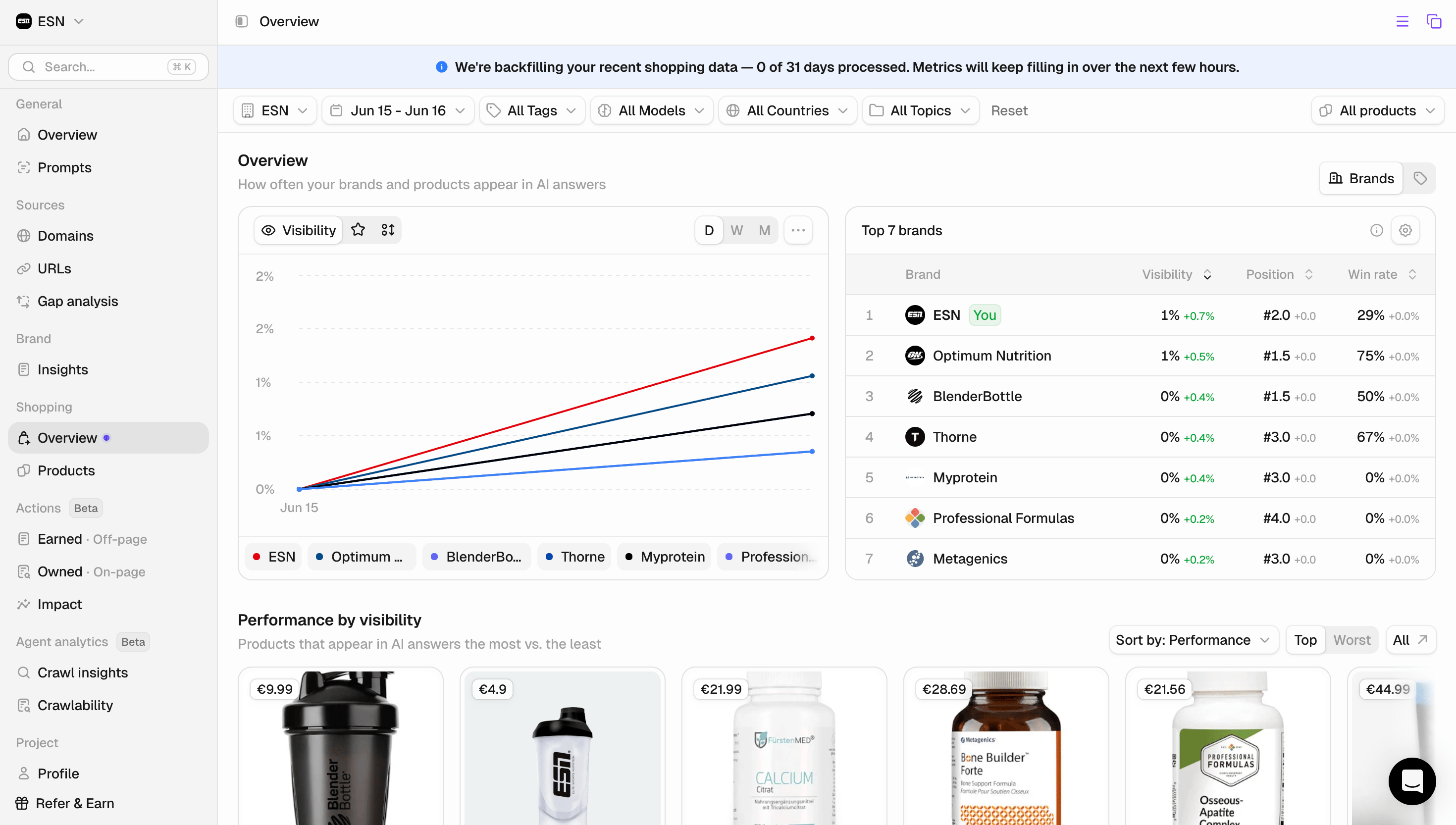
- Overview graph (Brands / Products): Shows the visibility, position, SoV, and Win Rate of your brand and competitors over time.
- You can toggle between “Brands” and “Products” on the right to view visibility for each. (If you select products, SoV will not be available.)
- Top 7 Brands / Products: Quick overview of the top 7 brands (or products) that are ranking in AI shopping.
- Performance by visibility: Shows the products that appear the most in AI answers versus the least ones.
- Shopping queries: Aggregated across all the prompts you’re viewing, these are the queries driving shopping answers. Peec surfaces the top queries, the ones gaining the most traction, and the new ones that have started appearing.
- Shopping fanout queries: The regular web searches the AI runs while writing its answers. Fan-outs shape the text around the carousel, and shopping queries decide which products fill it.
Shopping queries overlap heavily with Google Shopping search, so they double as a feed for your wider search and merchandising work.
Best practices
- Start before you upload a catalog: Open AI Shopping and review the products Peec AI already detects in your tracked chats. Exploring that view first shows you what the data covers, so you can connect a feed with a clear idea of what you’ll get in return.
- Live in the Products table once your catalog is in. It brings every metric for every product into one place, and you can filter by category, topic, and tag to focus on the segment that matters most, such as a single product line or campaign.
- Read win rate alongside visibility, not in isolation. Visibility shows you how often a product appears; the competitive view shows you what happens when it does. Looking at both together is what separates “we appear often” from “we actually win the slot.”
- Use Product Detail to find the prompts you lose. The per-product view shows the exact prompts a product wins and loses, along with the competitors it is measured against. Those losing prompts are your clearest, most specific opportunities for improvement.